
How to Choose the Perfect Office Chair for Your Body
Find the best office chair for comfort and support - get expert tips on choosing a chair that

37 min read
Surprising as it sounds, people spend nearly a third of their waking hours sittingand a poorly fitted chair can shave hours off your comfort and focus every week.
Choosing the best office chair for comfort is more than picking a pretty cover. Mass-produced seats are generic and often force the body into unhealthy positions. An ergonomic office chair that matches your body type helps preserve posture, reduces fatigue, and supports productivity over long workdays.
Personalization matters: seat height, seat pan depth, lumbar support, tilt control, and armrest adjustability shape how your spine, hips, and shoulders align. Even a well-built budget option with key ergonomic chair featurespneumatic height adjustment, reliable lumbar support, and a stable five-pedestal basecan deliver major gains for most workers.
Before you buy, compare dimensions to a comfortable reference chair and test adjustments while performing typical tasks for 60120 minutes. For a compact checklist and practical tips, see this office chair buying guide from Office Depot for more details on matching chair types and features to your needs: office chair buying guide.
Key Takeaways
- Select an ergonomic office chair that fits your bodyheight, seat depth, and weight capacity matter.
- Prioritize adjustable features: pneumatic height, tilt control, and reliable lumbar support.
- A good chair is an investment in health, focus, and long-term productivity.
- Test a chair for at least 60120 minutes while doing real tasks to judge comfort.
- Even budget ergonomic chairs with core features can be effective when chosen carefully.
Why your office chair matters for health, focus, and productivity
Choosing the right chair shapes daily comfort and long-term health. Small shifts in seat height, lumbar support, and tilt can cut fatigue, improve concentration, and limit aches that pull attention away from work. This makes the office chair a practical tool for peak performance, not just a piece of furniture.
How a poorly fitted chair harms posture and performance
Poorly fitted chairs invite slouching and forward head posture. Those habits strain the neck and upper back, raise discomfort, and increase distraction during tasks. Over time, repeated strain can lead to chronic pain and reduced productivity.
When a seat is too deep or the lumbar is missing, the pelvis tips and spinal curves flatten. That misalignment affects breathing and focus, making it harder to sustain attention on detailed work.
Seeing your chair as an investment in well-being
Think of a chair like an ergonomic teammate that supports longer, clearer workdays. Investing in quality while choosing ergonomic chairs reduces microbreaks for discomfort and lowers the chance of musculoskeletal complaints.
Employers and individuals who treat seating as part of workspace design often see fewer sick days and higher task output. This ties the office chair directly to workplace wellbeing and cost savings over time.
Research and workplace context: sitting risks and benefits
Clinical guidance favors dynamic sitting: brief recline, movement, and posture variation lower spinal load. Chairs that allow recline and targeted lumbar support reduce pressure on discs while promoting neutral alignment.
Studies compare chair types like kneeling, saddle, and ball seating. Some lower spinal compression, others shift effort to muscles during adaptation. That means no single chair fits every person; an office chair buying guide that stresses trial and adjustment gives the best outcome.
Use the best office chair for comfort as part of a broader plan: regular movement, posture checks, and workspace setup. Those measures combine to optimize health effects of chairs while sustaining focus and productivity.
Assessing your body type to find the right chair fit
Choosing ergonomic chairs starts with a simple self-check. Think about height, hip width, leg length, and any chronic pain. These traits shape how a chair supports your spine and lets you work without strain.

How height influences backrest height and seat depth needs
Taller users need higher backrests and deeper seat pans to support a longer torso and full thigh length. Adjustable seat depth or a longer fixed pan helps keep the knees 0.53 inches from the seat edge. Petite users need lower minimum seat height and shorter backrests so feet rest flat and circulation stays healthy.
Choosing seats for petite and taller users
Seat-pan width should be about 1 inch wider on each side than your hips. For short users, look for seats with shallow depth and a low rise near 16 inches or less. For tall users, seek at least a 20-inch seat height and deeper pans that support three-quarters of the thigh length.
Try models with adjustable lumbar and seat-pan tilt. These ergonomic chair features let the pelvis tip slightly forward and maintain the natural S-curve of the spine when reclining.
Weight capacity and why to choose a chair rated above your weight
Pick a chair rated above your weight to preserve support, durability, and safety. Chairs with reinforced frames and higher weight limits reduce wear on mechanisms and foam. Look for options rated 300 lbs or higher if you need extra capacity.
Real-world testing is essential. Sit for at least 30 minutes, change positions, type and recline. Watch for pressure behind the knees, hip squeeze, or shoulder tension. Use a brief checklist from trusted guides such as how to tell if an office chair is the right one for my when you compare models.
Balancing body type chair fit with key ergonomic chair features gives you the best office chair for comfort. Focus on seat depth, back height, and weight capacity. That lets the chair become an aid, not a source of pain.
Understanding lumbar support and lower-back ergonomics
Good lumbar support keeps the spine in a natural position and lowers pressure on discs during long sits. When you focus on choosing ergonomic chairs, look for designs that match the lower spine’s gentle inward curve. That reduces strain and helps maintain upright posture for extended work sessions.
Lordotic curve and how lumbar supports should fit your spine
The ideal lumbar support fills the lower back so there is a small hand-sized gap between your spine and the chair. This mimics the lordotic curve and prevents slouching. Chairs from brands like Herman Miller and Steelcase often describe their back profiles to show how they support that curve.
Adjustable vs fixed lumbar support: pros and cons
Adjustable lumbar support lets users move the pad up, down, in, or out. That flexibility helps shared workstations and varied body types. Fixed lumbar can work well for a single user whose shape matches the chair’s curve. Adjustable models add cost, but they rank high among ergonomic chair features for customization and long-term comfort.
Quick test: using a hand or towel to gauge the correct lumbar curve
A simple test shows whether support is right. Sit with your back against the chair. Slip your hand behind the small of your back. You want a snug fit, not a large space. If the gap is too big, add lumbar support cushions as a short-term fix. Use a rolled towel only briefly; repeated compression can flatten it and reduce effectiveness.
When evaluating lumbar support chairs, remember that proper fit beats flashy extras. Prioritize functional lumbar alignment when picking the best office chair for comfort and balance that need against price during choosing ergonomic chairs.
Seat pan design: depth, width, and edge shape matter
A well-designed seat pan keeps you comfortable for long work sessions. Proper seat pan depth and width let hips sit back against the lumbar support while leaving a small gap behind the knees. That clearance protects circulation and prevents pressure points during 60120 minute tasks.

Seat depth guidelines and the 0.53 inch clearance behind the knee
Aim for a seat pan depth that leaves about 0.53 inches between the seat edge and the back of your knees. If the seat is too deep youll sit forward and lose lumbar contact. If its too shallow your thighs wont get adequate support.
Waterfall front and contoured seats to prevent thigh compression
Waterfall front seats and contoured shapes reduce pressure at the knee crease. These designs encourage blood flow and stop the seat edge from digging into hamstrings. Many reviewers cite waterfall front seats as a key feature in the best office chair for comfort.
Foam density and long-term cushioning performance
Foam density matters for how a chair feels after months of daily use. Low-density foam can bottom out and lose support quickly. Look for two-layer constructions: a high-density base with a softer top layer for comfort. That combo prevents permanent deformation and yields steady support.
Use this office chair buying guide to compare seats by depth, edge shape, and foam specs. Check that the seat pan is at least one inch wider than your hips on each side and supports three-quarters of your thigh length. Also consider seat-pan tilt up to 30 degrees to reduce lumbar strain when you recline.
When testing chairs, sit for an hour while adjusting height and tilt. Pay attention to how the seat pan depth feels behind the knee, whether waterfall front seats ease pressure, and if foam density chairs maintain their shape. Those checks point you toward the best office chair for comfort for your body and tasks.
Adjustability checklist every ergonomic chair should have
A practical adjustability checklist helps you compare chairs and find the right match for daily work. Focus on parts you can change while seated, how each adjustment supports posture, and whether you can fine-tune settings for varied tasks.
Pneumatic height adjustment is the single most used control. It lets you make small in-seat moves so knees stay level and feet rest flat. Look for a smooth gas-lift that responds under load and has a height range that fits your desk setup.
Seat depth and forward/back adjustments prevent pressure behind the knees. Adjustable seat pans let shorter users move the edge forward and taller users slide it back. This feature pairs well with lumbar adjustments for consistent support.
Seat tilt and tilt tension let the chair move with you. A seat tilt ergonomic chair that offers up to about 1030 degrees of forward or backward tilt encourages dynamic sitting. Adjustable tension lets you set resistance so recline feels natural whether you lean back or stay upright.
Backrest height and recline range matter for varied postures. A recline that supports both upright work and relaxed leaning reduces spinal load. Chairs that lock at multiple angles and let you adjust back height suit a range of users and tasks.
Armrest adjustability makes upper-body comfort possible. Height, width, and pivoting pads keep shoulders relaxed during typing and mousing. Removable or tuck-away armrests help users who need closer desk access.
Check for reliable mechanism quality and easy-to-reach levers. When choosing ergonomic chairs, test adjustments while seated and note how each change affects comfort for 3060 minutes.
Use this list when shopping for the best office chair for comfort: responsive pneumatic height adjustment, a versatile seat tilt ergonomic chair design, adjustable lumbar, multi-angle recline, and adaptable armrests. These elements form a durable, user-friendly baseline for productive workdays.
Armrests, shoulder support, and upper-body comfort
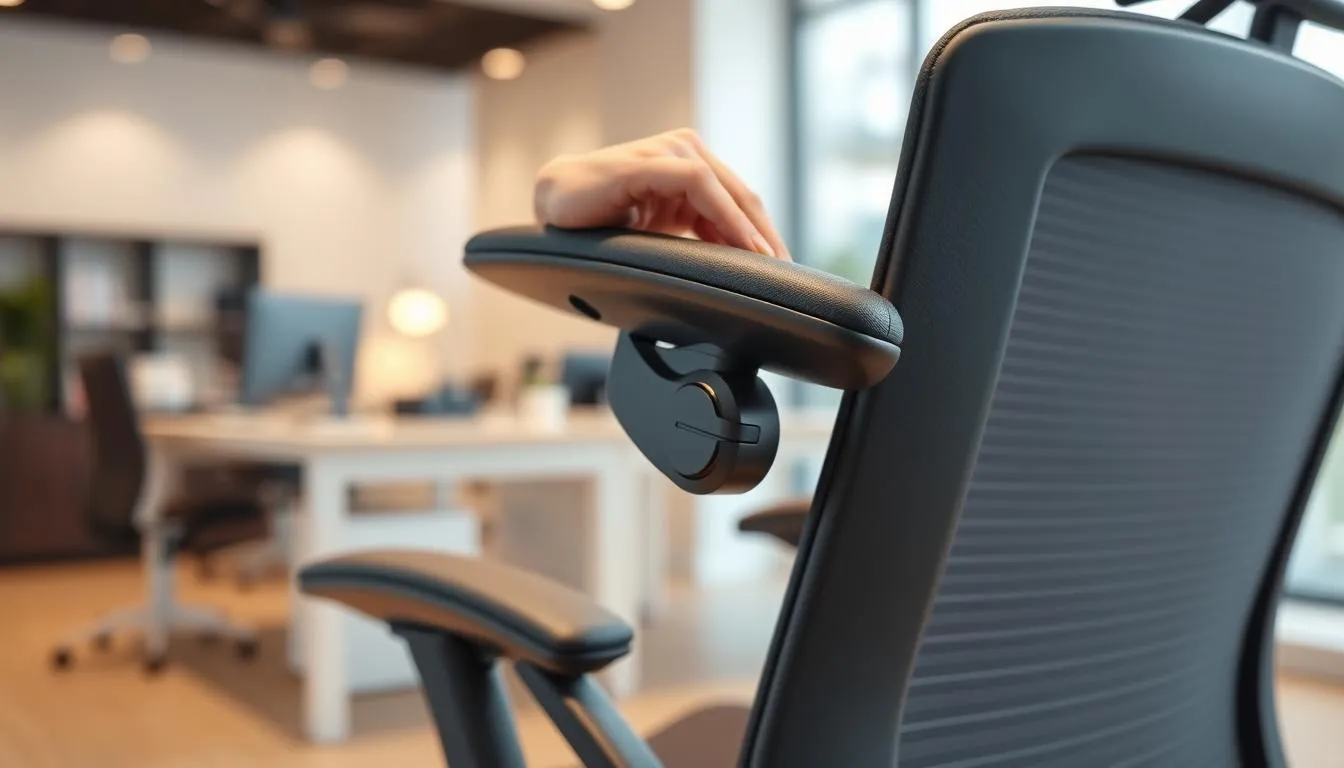
Good armrest adjustment keeps shoulders relaxed and reduces rounded posture during long workdays. Adjustable-height armrests let your forearms sit level with the desk. That prevents shoulder shrugging and cuts tension across the neck and traps.
Width and rotation matter as much as height. Armrests set too wide force shoulder abduction and fatigue. Adjustable-width models bring supports closer to the torso so the forearm rests naturally. Look for broad, contoured pads that avoid hard pressure on the ulna and elbow joint.
Padding and shape affect comfort during typing sessions. A soft, gently curved cap spreads pressure and reduces hotspots. Some users prefer firmer foam for better control when mousing. Test both styles when comparing ergonomic chair features in an office chair buying guide.
There are times to move or remove armrests. For focused mousing work your elbows often need to sit behind the torso. A shoulder support chair that lets you slide the armrests out of the way maintains reach without forcing an awkward posture. Chairs with flip-up or removable rests work well for hybrid tasks.
Adjustable armrests are one of the most important ergonomic chair features for upper-body comfort. Brands such as Herman Miller and Steelcase offer multi-directional adjustments that support a wide range of bodies. For practical comparisons, see a hands-on review like the one at best office chair reviews.
- Tip: Set armrest height so your shoulders feel relaxed while typing.
- Tip: Move armrests outward for larger tasks, inward for close typing.
- Tip: If armrests dig into the forearm, try a different shape or more padding.
| Adjustment | Benefit | When to change |
|---|---|---|
| --- | --- | --- |
| Height | Keeps shoulders neutral, lowers neck tension | Typing long stretches |
| Width | Prevents shoulder abduction and fatigue | When shoulders feel wide or cramped |
| Pad shape & padding | Even pressure distribution for comfort | Mousing or wrist pressure discomfort |
| Removable/flip-up | Clear space for close-in tasks | Heavy mousing or reaching under desk |
Headrests and neck support: when they help (and when they dont)
Headrests can be a helpful addition for people who lean back while reading or take short breaks in their chair. They provide targeted headrest benefits for those with recurrent neck strain. Still, many users never touch the headrest during normal typing or focused screen work.
Look for ergonomic chair features that let you adjust height and depth. An adjustable headrest suits midsized back chairs and supports the base of the skull when set correctly. Use that support to ease tension, not to mask a poor monitor or desk setup.
Who benefits from an adjustable headrest
People who habitually recline, those recovering from minor neck strain, and users who switch often between focused work and relaxed reading gain the most. A neck support office chair is especially useful for taller users whose head sits above a standard backrest.
Proper headrest positioning for neutral neck alignment
Set the headrest so the earlobe aligns between the collarbone and neck muscles. The depth should cradle the base of the skull without pushing the head forward. Test this while seated and with the monitor at eye level to maintain neutral posture.
When choosing ergonomic chairs, prioritize monitor height, lumbar fit, and seat depth before adding head support. Overreliance on a headrest can point to an improper workstation. For most people, the best office chair for comfort balances lumbar support, seat fit, and selectively used head support.
Base, casters, and mobility: stability and floor compatibility
A stable base and the right casters make a mobility ergonomic chair feel like an extension of your body. Start with reinforced components and a five-star base for reliable support during recline and lateral movement. A solid base reduces tip risk when you reach, lean, or shift posture.
Why a five-pedestal base is recommended
A five-pedestal base spreads load evenly and resists tipping better than four-legged designs. Office environments from open-plan firms to home studios benefit from that extra stability. Durable materials such as reinforced nylon or aluminum add longevity, especially for heavy users or prolonged daily use.
Choosing casters for carpet, hard floors, or casters with brakes
Match office chair casters to your floor. Soft polyurethane casters with a durometer around 60A70A protect hardwood and tile while running quietly. Hard nylon or polypropylene castors rated 90A+ roll better on low-pile carpet. For high-pile carpet, choose larger dual-wheel casters, 65 mm or 75 mm in diameter, to avoid sinking and reduce starting torque.
Locking casters help keep a chair stable at standing desks or near equipment. Verify stem size before buying replacements; most stems are 11 mm diameter 22 mm length. If you want detailed guidance on caster types and maintenance, check this office chair caster guide.
Swivel and reach: why mobility supports productivity
Free-gliding casters and smooth swivel let you access tools without twisting the spine. Reduced reaching cuts micro-strain and keeps shoulders relaxed during long tasks. Upgrading from 50 mm to 75 mm wheels can lower starting torque by roughly 40 percent for heavier users, making repositioning easier.
Regular maintenance preserves mobility. Clean the swivel and axle monthly, trim hair with scissors when needed, and use silicone-based lubricant for bearings. These small steps keep a mobility ergonomic chair performing like new and contribute to the search for the best office chair for comfort.
| Floor Type | Recommended Caster Material | Durometer | Recommended Diameter | Benefits |
|---|---|---|---|---|
| --- | --- | --- | --- | --- |
| Hardwood / Tile | Soft polyurethane | 60A70A | 65 mm | Protects floors; quiet operation |
| Low-Pile Carpet | Hard nylon / polypropylene | 90A+ | 5065 mm | Lower rolling resistance; smooth glide |
| High-Pile Carpet | Dual-wheel, large diameter | 90A+ | 75 mm (2.53 in) | Prevents sinking; reduces stuck feeling |
| Industrial / Concrete | Solid rubber | 70A80A | 6575 mm | Shock absorption; durable under load |
Materials and upholstery: breathability, cleaning, and allergies
Choosing chair upholstery affects comfort, cleaning needs, and indoor air quality. Fabrics change how hot you feel, how spills behave, and how easy it is to keep a workspace healthy. Think about daily use, who sits in the chair, and whether pets or kids might add spills or dander.
Cloth offers softness and a warm feel. It holds color well and hides wear. Expect more effort to remove spills. Cloth over foam can trap moisture and become a home for dust mites. For people with allergies, cleanability is a major factor when picking between mesh vs cloth chairs.
Mesh stands out for breathability and cooling during long days. It dries fast after a spill and resists sweat buildup better than vinyl. Mesh frames often support airflow around the lumbar area. If you need a stain resistant office chair, look for mesh with treated fibers or a removable, cleanable seat pad.
Vinyl and leather-like surfaces wipe clean in seconds. They work well where food or liquids are common. Expect less airflow. Heat and moisture can build up, making long sits less comfortable for some users. For intensive cleaning needs, vinyl can be the practical choice despite the trade-offs in breathability.
Performance textiles blend durability with easy care. Many brands use treated yarns that repel stains and block liquids at the surface. These fabrics extend the life of a chair and reduce the frequency of deep cleaning. In busy offices, a stain resistant office chair with performance textile saves time and maintains a neat look.
Allergen considerations chair owners should make include foam type and cover material. High-density foam can trap dust if the cover is porous. Choose tightly woven fabrics or washable covers to limit dust-mite reservoirs. Regular vacuuming and using allergen-proof covers helps reduce triggers for sensitive users.
Here is a quick comparison to guide choices based on cleaning, breathability, and allergy risk.
| Material | Breathability | Cleaning Ease | Allergen Risk | Best Use |
|---|---|---|---|---|
| --- | --- | --- | --- | --- |
| Cloth | Moderate | Spot clean; deep cleaning needed | Higher if not sealed; dust-mite friendly | Comfort-focused offices; cool climates |
| Mesh | High | Wipes and air dries quickly | Lower when open weave allows cleaning | Sedentary work; warm environments; best office chair for comfort seekers |
| Vinyl / Faux Leather | Low | Very easy to wipe and disinfect | Low surface dust but traps heat | Reception areas; shared stations; spill-prone spaces |
| Performance Textiles | Varies by weave | Designed for stain resistance and quick cleaning | Moderate to low with treated fibers | High-traffic offices seeking durability and hygiene |
Care routines matter as much as the material. Vacuum fabric seats weekly, wipe vinyl after spills, and air out mesh panels. Small maintenance steps keep any chair upholstery looking and performing better over its usable life.
Specialty seating options: when to consider kneeling, saddle, or ball chairs
Alternative seating can help users who need a break from traditional office chairs. Small changes in seat angle and hip opening often improve spinal alignment and reduce slouching. Choosing ergonomic chairs means matching the seat to tasks and body needs, not following trends.
Benefits and limitations of kneeling chairs
Kneeling chairs place weight through the shins and tilt the pelvis forward to promote a natural lumbar curve. Many users report reduced lower-back strain and better core activation when short sessions replace long sits. For those exploring kneeling chairs benefits, adjustable models fit varied desk heights and multi-user setups.
Drawbacks include pressure on the knees and potential spinal muscle fatigue during extended use. People with knee conditions or who wear skirts may find them uncomfortable. Test brief sessions before committing to long-term use and consider alternating with a conventional chair.
Saddle chairs for specific professions and posture effects
Saddle chairs mimic a riding stance that rotates the pelvis forward and preserves the lumbar curve. This saddle chair posture is popular with dentists, hairdressers, and clinicians who need mobility and close access to patients. The design reduces spinal compression and can make slouching unlikely.
Users should note saddle seats often require higher desks and may tire spinal stabilizers during long, unsupported hours. Many people prefer trousers when using saddle seats. For options and comparison, read this overview from Salli on kneeling and saddle designs: kneeling vs saddle chairs.
Exercise balls and ball chairs: short-term gains and long-term limits
Ball chairs increase lower-back muscle activity and can nudge posture into a more upright position for short stints. They work well for stretching breaks and brief tasks that benefit from gentle core engagement.
Ball chair risks include spinal compression after about an hour and lack of reliable height adjustment. Most users report discomfort with prolonged use and storage can be awkward. Use exercise balls sparingly and as part of a rotation of seat types rather than a full-time replacement.
| Seat Type | Main Advantages | Main Drawbacks | Best Use Case |
|---|---|---|---|
| --- | --- | --- | --- |
| Kneeling chair | Opens hips, supports S-shaped spine, good for short focused work | Knee pressure, limited mobility, tiring for spinal muscles over time | Short sessions, adjustable multi-user workstations |
| Saddle chair | Promotes forward pelvis, stable lumbar curve, easy to move around workspace | Requires higher desk, can fatigue back muscles, usually needs trousers | Dental, clinical, and workshop professions needing mobility |
| Ball chair | Boosts core activation briefly, simple and inexpensive for short use | Spinal shrinkage after about an hour, poor height control, storage issues | Active breaks, occasional posture training |
| Traditional ergonomic chair | Adjustability, sustained lumbar support, designed for long hours | Can encourage prolonged sitting if not paired with movement | All-day desk work seeking the best office chair for comfort |
Durability, warranty, and eco-friendly choices
Choose a chair that pairs strong materials with serviceable parts. Look for precision steel mechanisms, reinforced nylon or aluminum bases, and heavy-duty casters. High-density foam and premium upholstery resist sagging and support chair durability over years.
Materials and mechanisms that indicate long life
Frames made from steel or forged aluminum signal longer life than thin stamped metal. Gas lifts with rated cycles, braided cables, and metal-to-metal pivots reduce failure points. Check foam density ratings and fabric rub counts to avoid early wear.
Interpreting warranties and manufacturer support
Read warranty for office chairs closely. Warranties reveal what a brand stands behind. Long-term coverage for frames and mechanisms suggests confidence in build quality. Shorter warranties often require extra checks on replaceable parts and local service options.
Sustainable materials and recycled-content options
Eco-conscious buyers should seek a sustainable office chair with recycled frames, soy- or plant-based foams, and low-VOC finishes. Certifications from BIFMA or GREENGUARD help verify claims. Choosing recycled textiles cuts waste while keeping performance high.
Use this office chair buying guide to weigh cost against lifespan. A pricier model with verified parts and a solid warranty for office chairs can save money over time. For many users, a well-built budget chair with key adjustments can meet daily needs and approach the best office chair for comfort without overspending.
How to trial and test a chair before you buy
Start with a short checklist before you sit. Note seat height, seat depth, lumbar position, armrest range, recline stability, and cushioning feel. Use manufacturer tools or a store showroom to try office chair models that match your body and work tasks.
Minimum sit-test time and sensations to watch for
Spend at least 60120 minutes on a single model to feel how support wears over time. First impressions can be misleading; some cushions feel fine for minutes but compress and cause pressure later. Watch for pressure behind the knees, hips that slide forward, or lumbar support that loses contact when you recline.
Pay attention to muscle fatigue, numbness in hands or legs, and hotspots on the seat. These signs show a chair may fail longer tests for the best office chair for comfort.
Testing adjustments while seated and during typical tasks
While seated, change seat height and depth, tilt and tilt tension, armrest height, and lumbar height. Perform usual tasks: typing, mousing, reaching for a phone, and leaning back to read. A practical office chair buying guide suggests testing adjustments in the order you would use them daily.
Check whether the chair supports neutral posture during each task. If you must hunch, move your monitor, or repeatedly reset controls, that chair may not suit your routine.
Return policies, trial periods, and why they matter
Confirm return policies ergonomic chair offers before purchase. Trial periods let you test long-term comfort at home and reveal issues a showroom cannot. Ask about restocking fees, shipping for returns, and warranty coverage for parts that wear after weeks of use.
Use an office chair buying guide and retailer terms to compare offers. If the vendor lacks a clear trial or flexible return policy, plan a longer in-store chair sit-test and be cautious when committing to a single model.
For extra guidance on testing steps and detailed tests to run while you sit, see this buyers walkthrough from a trusted office seating resource: chair sit-test guide.
best office chair for comfort
Finding the best office chair for comfort starts with a clear list of what matters. Prioritize supportive lumbar design, the right seat depth, high-density cushioning, and adjustments you will actually use. Think of the chair as an investment in focus and long-term health.
Key features to look for
Look for pneumatic height, seat-pan tilt, adjustable lumbar support, and armrests that move in multiple directions. Mesh backs help breathability while thick layered foam preserves cushioning. A five-pedestal base adds stability and smooth mobility.
Matching features to your body type and work habits
Match seat depth so there is about 0.53 inches behind the knee. Taller users need deeper pans and higher backs. Petite users benefit from shorter seat depths and narrower backrests. If you spend long hours on video calls, an adjustable headrest and richer lumbar options give extra neck and shoulder relief.
Budget ranges and maximizing comfort per dollar
Budget ergonomic chairs can hit the main requirements: height adjustment, tilt, and basic lumbar support. Spending more buys longer warranties, denser foam, and refined mechanisms. Compare models like Ticova Ergonomic for value and Haworth or Steelcase for longer-term durability.
For compact comparisons and to help pick a model that suits your needs and budget, consult this concise office chair buying guide for more details: best office chair reviews.
| Model | Comfort highlights | Price range | Warranty / Returns |
|---|---|---|---|
| --- | --- | --- | --- |
| Ticova Ergonomic | Adjustable headrest, deep recline, multi-adjust | $129$199 | 1 year warranty |
| Branch Task | Tall backrest, soft arm pads, 4-position tilt lock | ~$299 | 5 year warranty; 30-day returns |
| Haworth Assure | Thick seat pad, mesh back, foundational lumbar | Starting ~$329 | 5 year warranty; free returns |
| Eurotech Vera | Hammock-like backrest, padded seat, adjustable arms | $484.99 | Upholstery 5 years; 30-day returns |
| Haworth Soji | 4D arms, seat depth, strong lumbar options | Starting ~$652 (2026) | 12 years components; free returns |
| Refurbished Steelcase Amia | LiveLumbar support; 4-way arms | $502$999 | 12 year warranty |
| Steelcase Leap v2 | Flexible back, four-way arms, broad fit | $649 (refurb)$1,399 (new) | 12 year warranty |
| Herman Miller Embody | Pixelated seat support, modern flexibility | ~$1,940 | Manufacturer warranty varies |
Conclusion
Choosing ergonomic chairs is a personal decision and worth treating as an investment in health, focus, and productivity. Consider your body type, posture, and daily tasks when using an office chair buying guide or chair-finder tools. Trying models in person helps confirm seat-pan fit and comfort before committing.
Look for core ergonomic chair features: pneumatic height, adjustable lumbar support that matches your lordotic spine, recline range, and a five-pedestal base for stability. Most people can find the best office chair for comfort without extreme expense if those adjustments are present. Specialty seats have specific uses but may not replace a fully adjustable task chair for all-day work.
Prioritize durability and manufacturer support: choose chairs rated above your weight, appropriate upholstery, and clear trial or return policies. Test chairs for 60120 minutes while performing typical tasks to assess long-term comfort. Following this office chair buying guide will make it easier to match features to your needs and get lasting value from your purchase.
FAQ
How should I choose the perfect office chair for my body?
Start by matching chair dimensions and adjustments to your body. Measure your seated hip width, thigh length, and height. Look for adjustable seat depth so your hips contact the backrest with a 0.53 inch gap behind your knees, a backrest tall enough to support your torso, and lumbar support that follows your natural lordotic curve. Prioritize pneumatic height, adjustable lumbar, recline with tension control, and armrests that move in height and width. Consider foam quality a two-layer system (high-density foam under a memory-foam top) prevents bottoming out and preserves comfort over time. Treat the chair as an investment in health and productivity and choose a model rated above your weight for durability.
Why does my office chair really matter for health, focus, and productivity?
A well-fitting chair supports neutral spinal alignment, reducing fatigue, distraction, and musculoskeletal risk. Poorly fitted mass-produced chairs encourage slouching, forward head posture, and rounded shoulders, which erode comfort and concentration over hours. The right chair reduces microbreaks from pain, helps maintain posture, and supports dynamic sitting all of which help focus and longterm wellbeing.
How can a poorly fitted chair harm posture and performance?
If seat depth, lumbar support, or height are wrong youll slide forward, slouch, or raise your shoulders. That creates hunched necks, increased disc pressure, and muscle fatigue. Over time these patterns can become habitual, increasing pain and reducing concentration and productivity.
Should I think of a chair as an investment in wellbeing?
Yes. A quality ergonomic chair that fits your body reduces fatigue, lowers musculoskeletal risk, and supports sustained focus. Spending more on durable materials, higherdensity foam, and adjustable features often pays off through longevity and fewer healthrelated interruptions.
What does research say about sitting risks and ergonomic benefits?
Research favors dynamic sitting and neutral spinal alignment. Ergonomic chairs that enable pelvic and lumbar support reduce spinal stress, though adaptation can tax muscles initially. Specialty seats (kneeling, saddle, ball) may help some tasks but can be tiring or impractical for allday use. Overall, adjustable ergonomic chairs that promote movement and support multiple postures offer the best balance.
How does height influence backrest height and seat depth needs?
Taller users need deeper seats and higher backrests to support longer torsos and thighs. Seat depth adjustment prevents excess pressure behind the knee. Petite users need lower minimum seat heights and smaller backrests so feet stay flat and circulation is preserved. Adjustable seat depth and back height make a chair usable across sizes.
What if Im petite or very tall which features matter most?
Petite users should look for lower minimum seat height, smaller backrests, and narrower seat pans. Taller users need deep seats, higher backrests, and adjustable lumbar positioned higher. Seatdepth adjustment and adjustable lumbar in/out and up/down are especially helpful for fitting different torso lengths.
How important is weight capacity when choosing a chair?
Very important. Choose a chair rated above your weight to prevent premature wear, mechanism stress, and loss of support. A higher weight rating helps maintain cushion integrity and ensures the mechanisms operate within their design limits; many durable models are rated up to 350 lbs or higher.
What is the lordotic curve and how should lumbar support fit my spine?
The lordotic curve is the natural inward curve of your lower spine. Lumbar support should fill that curve so theres a small handsized gap not too large and not too flat. Proper lumbar support encourages upright posture and reduces lowerback strain.
Adjustable vs fixed lumbar support which is better?
Adjustable lumbar (height and depth) is best for multiuser desks or variable body shapes because it customizes fit. Fixed lumbar can work for a single user if it matches your curve well. Temporary fixes like rolled towels work short term but often flatten and lose effectiveness.
How can I quickly test if lumbar support fits correctly?
Sit back and slide your hand between your lower back and the lumbar pad. There should be a small gap that feels like a gentle support. If your hand passes easily with a large space, the support is too shallow; if you cant fit your hand, its too aggressive.
What seat pan dimensions should I look for?
The seat pan should be at least one inch wider than your hips on each side. Depth should allow 0.53 inches of clearance behind the knee with hips touching the backrest. The front edge should be waterfallshaped and padded to avoid thigh compression.
Why does the waterfall front and contoured seat matter?
A waterfall front prevents the seat edge from digging into the back of the knees, which helps circulation and comfort. Contoured seats distribute weight across the thigh and buttocks, preventing pressure points and improving longsession comfort.
How does foam density affect longterm cushioning performance?
Lowdensity foam deforms and loses support fast. Higherdensity foam, ideally under a softer memoryfoam top (a twolayer design), prevents bottoming out and maintains shape. Quality foam keeps lumbar geometry stable over years.
What adjustments are essential on an ergonomic chair?
Essential adjustments include pneumatic seat height, seat depth, adjustable lumbar (height and depth), recline with tension control, and adjustable armrests (height and width). A fivepedestal base and a locking or multiposition recline are also important for dynamic sitting.
Why is pneumatic height adjustment preferred?
Pneumatic height lets you finetune while seated, keeping knees level and feet flat. Small inseat changes throughout the day support circulation and comfort without standing up to reach a lever.
How important are seat tilt and tilt tension for dynamic sitting?
Seat tilt and adjustable tilt tension let you change posture and distribute pressure between the seat and backrest. Tilting the seat slightly forward or backward supports the pelvis and encourages movement, reducing static load on spinal discs.
What backrest height and recline range should I expect?
Backrest height should support your lumbar and midback; taller backrests or headrests help taller users or those who recline a lot. A recline range that allows relaxed positions (up to roughly 110135 degrees) with adjustable tension supports dynamic sitting. Avoid locking the chair in one static position.
How should armrests be adjusted for shoulder comfort?
Armrests should be adjusted so forearms rest lightly with shoulders relaxed. Width adjustment avoids shoulder abduction. They should be movable out of the way for mousing and typing so elbows can sit close to the torso when needed.
What armrest shapes and padding work best for typing long hours?
Broad, contoured, and softly padded armrests distribute pressure across the forearm and avoid bony contact. Rounded edges and a slight forward cant can improve support while typing. Removable or flipback armrests add flexibility for varied tasks.
When should I remove or move armrests for mousing and typing?
Move or lower armrests when they prevent elbows from being close to the body or force you to raise shoulders. Proper typing posture often requires elbows near your sides; armrests should support the forearms without pushing the torso forward.
Who benefits from an adjustable headrest and when is it unnecessary?
Adjustable headrests help users who recline often or suffer neck strain and for tasks that involve leaning back. For most desktop tasks, correct monitor height and neutral posture reduce the need for a headrest. Use headrests when they can be positioned to support the head without pushing the chin forward.
How do I position a headrest for neutral neck alignment?
Set the headrest so it supports the base of the skull and keeps the earlobe aligned over the shoulder without pushing the chin forward. Height and depth adjustments should allow the head to rest lightly in a neutral position.
Why is a fivepedestal base recommended?
A fivepedestal base provides stability and reduces tip risk. It evenly distributes load on the casters, supporting smooth swivel and reach without compromising balance.
Which casters should I choose for my floor type?
Use hardfloor casters (soft rubber) for wood or tile to avoid damage and ensure smooth rolling. For carpet choose harder casters. Consider locking casters if you need the chair to stay put. Match caster type to flooring for safety and mobility.
How does mobility and swivel improve productivity?
Swivel and smooth casters reduce twisting and reaching, letting you access materials without straining. Mobility encourages small movements that reduce static loading and support dynamic sitting, improving comfort and efficiency.
What are the tradeoffs between cloth, mesh, and vinyl upholstery?
Mesh offers breathability and cooling but can feel firm if not wellcushioned. Cloth is comfortable and soft but traps spills and allergens more than mesh. Vinyl is easy to clean and spillresistant but can trap heat and moisture. Choose based on climate, cleaning needs, and allergen concerns.
Are performance textiles and stainresistant fabrics worth it for busy workspaces?
Yes. Performance textiles resist stains, are easier to clean, and often use tighter weaves that reduce allergen buildup. They extend usable life in hightraffic environments and lower maintenance demands.
How do foam seat pans affect allergens and maintenance?
Foam seat pans under cloth can harbor dustmite allergens if not cleaned. Breathable materials and removable, washable covers reduce allergen buildup. For allergy concerns, choose mesh or performance textiles and maintain regular cleaning.
When should I consider specialty seating like kneeling, saddle, or ball chairs?
Consider specialty seating for specific tasks or intermittent use. Kneeling chairs can encourage pelvic tilt and improved lumbar posture but may be tiring for prolonged use and problematic for knee issues. Saddle chairs give excellent pelvic alignment for tasks requiring forward posture (e.g., dental work) but need higher work surfaces. Ball chairs can increase core activation shortterm but often become uncomfortable after an hour and lack height adjustment. Specialty seats are niche tools rather than universal replacements for a good ergonomic office chair.
What materials and mechanisms indicate a chair will be durable?
Look for precision steel mechanisms, reinforced bases, highdensity foam, and heavyduty casters. A fivepedestal base, robust tilt mechanisms, and metal uprights signal longevity. Check for replaceable parts and clear manufacturer support.
How should I interpret warranties and manufacturer support?
Longer, comprehensive warranties (covering mechanisms, frame, and foam) show manufacturer confidence. Verify whats covered (wear, mechanisms, upholstery) and for how long. Return policies and trial periods are crucial since real comfort often appears after extended use.
Are ecofriendly chairs a practical choice?
Yes, if sustainability matters. Many chairs use recycled metals, reclaimed plastics, and lowVOC finishes. Sustainable choices can be durable and comparable in comfort; check certifications and manufacturing transparency.
How long should I sittest a chair before buying?
Sittest for at least 60120 minutes while performing typical tasks (typing, mousing, reaching). Short impressions can be misleading; extended testing reveals whether lumbar support, cushioning, and adjustments remain comfortable over time.
What should I test while seated during a trial?
While seated, adjust seat height, seat depth, lumbar height/depth, armrest height/width, and recline tension. Perform normal tasks and notice pressure points, muscle fatigue, and whether the lumbar support holds its shape. Pay attention to circulation at the knees and whether the seat bottoms out.
Why do return policies and trial periods matter?
Because initial comfort differs from longterm comfort. Good return policies allow realworld testing and protect you if a chair causes pain after hours of use. Prioritize vendors that offer extended trials or easy returns.
What are the key features of the best office chair for comfort?
The best chairs combine proper seatpan fit, adjustable lumbar support, adequate seat depth, highdensity cushioning (twolayer foam recommended), pneumatic height, recline with tension control, adjustable armrests, breathable upholstery, a fivepedestal base, and a weight rating above your body weight. Warranty and trial options round out a confident purchase.
How do I match features to my body type and work habits?
Identify your primary needs: long focused sitting needs better lumbar and cushioning; frequent mousing needs armrests that move away; shared workstations need adjustable lumbar and seat depth. Match chair adjustments to those needs and pick materials suited to your environment (mesh for heat, performance textiles for spills).
What budget should I set and how do I get the most comfort per dollar?
Good budget ergonomic chairs with pneumatic height, tilt, and lumbar support can serve most workers well. If you can spend more, prioritize higherdensity foam, durable mechanisms, and better upholstery. Balance price against essential adjustments for your body so you dont overpay for unused features.